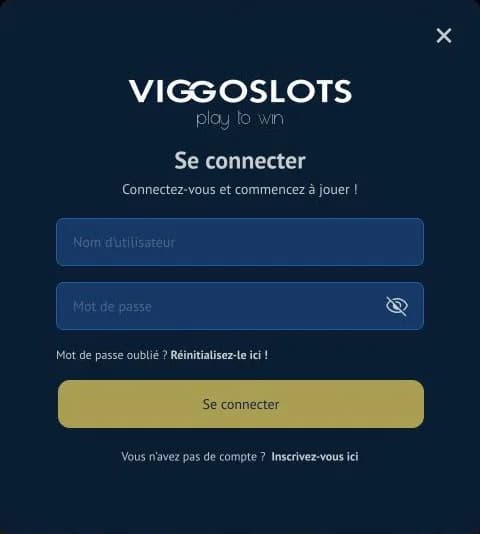
How to log in
- 1Go to viggoslots.comType the address yourself or use a bookmark. Check that the address bar shows viggoslots.com with a padlock (HTTPS). Our official site page explains how to recognise it.
- 2Open the login windowClick the login button on the site to open the login window.
- 3Enter your username and passwordUse the username chosen at sign-up, not your email address. This is the most common reason a login fails.
Forgotten password
Below the password field, a “forgot your password? reset it here” link starts the reset process. Use it rather than trying many passwords in a row. If you no longer have access to the email address on your account, or have forgotten your username, contact support at support@viggoslots.com; the live chat requires you to be logged in, so email is the route when you cannot sign in.
Keeping your account secure
- Use a password you do not use anywhere else, and a password manager if possible
- Never enter your login details from a link received by message from someone you do not know
- Log out on shared devices and do not let your browser save the password there
- The casino says connections are protected by 256-bit SSL encryption: check for the padlock before logging in
- Do not share your account: the terms allow one account per person, used only by its owner
What logging in gives you
Once signed in, you reach the cashier for deposits and withdrawals, the transaction history (Cashier, then History: bets, transactions, pending withdrawals), the Cashback page to claim your cashback, and the live chat, open from 10:00 to 23:00 CET. Responsible gambling tools such as deposit limits are also set from your account.
If the login still fails
Check that caps lock is off and that you are typing the username, not the email. Clear your browser's saved password if it holds an old one, or try another browser. If your account has been closed or self-excluded, the way back goes through support rather than the login window. In all other cases, email support@viggoslots.com from the address registered on your account and give your username; never send your password.
Go to viggoslots.com and sign in with your username.
Claim the bonusInactive and closed accounts
Logging in from time to time matters for two reasons. Under the bonus terms, a bonus is removed if you do not log in for 2 months. Under the general terms, an account becomes inactive after 6 months; the casino may then charge a fee of up to €5 a month, after warning you by email. If you closed your account and want to reopen it, the help centre says to email support. If you closed it because of gambling problems, think carefully before asking to reopen it.
18+ only. If you find yourself logging in more often than you would like, deposit limits and self-exclusion are available: see our responsible gambling page. Free help: Gambling Therapy.
Frequently asked questions
Do I log in to Viggoslots with my email?
No. The login window asks for your username and password.
I forgot my Viggoslots password. What should I do?
Use the “forgot your password?” link in the login window. If that does not work, email support@viggoslots.com.
Why can't I open the Viggoslots live chat?
According to the terms, the live chat is available once you are logged in, from 10:00 to 23:00 CET. Without access to your account, use support@viggoslots.com.
What happens if I don't log in for a long time?
An active bonus is removed after 2 months without a login. After 6 months the account is inactive, and a fee of up to €5 a month can be charged.
Read also
- 01Viggoslots sign-up: the registration form step by stepThe Viggoslots registration form field by field, with the choices you cannot change afterwards.
- 02Viggoslots customer support: chat, email and help centreContacting Viggoslots: chat hours, email, help centre and which channel to use for what.
- 03Viggoslots official site: the right addressThe official Viggoslots address, help centre and support email, plus tips for reaching the right site.